nacos-sync官方文档上标明是支持集群模式部署的:
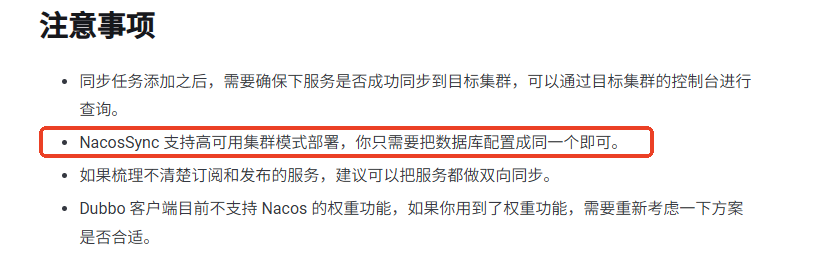
我采用nginx+systemd的方式实现高可用访问。
步骤
安装nginx
yum -y install nginx修改配置文件
cat /etc/nginx/conf.d/nacos-sync.conf

upstream nacos-sync-cluster {
    server 127.0.0.1:28083 max_fails=3 fail_timeout=30s;
    server 127.0.0.1:28084 max_fails=3 fail_timeout=30s;
    server 127.0.0.1:28085 max_fails=3 fail_timeout=30s;
}

server {
    listen       28080;
    server_name  localhost;

    location / {
        proxy_pass http://nacos-sync-cluster;
        proxy_set_header Host $host;
        proxy_set_header X-Real-IP $remote_addr;
        proxy_set_header X-Forwarded-For $proxy_add_x_forwarded_for;

        proxy_connect_timeout 5s;
        proxy_send_timeout 10s;
        proxy_read_timeout 10s;

        # 故障转移(被动健康检查)
        proxy_next_upstream error timeout http_500 http_502 http_503 http_504;
        proxy_next_upstream_timeout 5s;
        proxy_next_upstream_tries 3;
    }

    location /nginx-status {
        stub_status on;
        access_log off;
        allow 127.0.0.1;
        deny all;
    }
}
启动nginx
nginx -t
systemctl start nginx
创建systemd服务
为每个nacos-sync创建systemd服务:
vim /etc/systemd/system/nacos-sync-28083.service

[Unit]
Description=Nacos Sync Service (28083)
After=network.target

[Service]
Type=forking
User=root
Group=root
WorkingDirectory=/root/wgh/nacos-sync
ExecStart=/root/wgh/nacos-sync/bin/startup.sh start
ExecStop=/root/wgh/nacos-sync/bin/shutdown.sh
Restart=always
RestartSec=10
Environment="SERVER_PORT=28083"

[Install]
WantedBy=multi-user.target
vim /etc/systemd/system/nacos-sync-28084.service
[Unit]
Description=Nacos Sync Service (28084)
After=network.target
[Service]
Type=forking
User=root
Group=root
WorkingDirectory=/root/wgh/nacos-sync2
ExecStart=/root/wgh/nacos-sync2/bin/startup.sh start
ExecStop=/root/wgh/nacos-sync2/bin/shutdown.sh
Restart=always
RestartSec=10
Environment="SERVER_PORT=28084"
[Install]
WantedBy=multi-user.targetvim /etc/systemd/system/nacos-sync-28085.service
[Unit]
Description=Nacos Sync Service (28085)
After=network.target
[Service]
Type=forking
User=root
Group=root
WorkingDirectory=/root/wgh/nacos-sync3
ExecStart=/root/wgh/nacos-sync3/bin/startup.sh start
ExecStop=/root/wgh/nacos-sync3/bin/shutdown.sh
Restart=always
RestartSec=10
Environment="SERVER_PORT=28085"
[Install]
WantedBy=multi-user.target启动服务
# 重新加载 systemd 配置
systemctl daemon-reload

# 启用开机自启
systemctl enable nacos-sync-28083
systemctl enable nacos-sync-28084
systemctl enable nacos-sync-28085

# 启动服务
systemctl start nacos-sync-28083
systemctl start nacos-sync-28084
systemctl start nacos-sync-28085

# 查看服务状态
systemctl status nacos-sync-28083
systemctl status nacos-sync-28084
systemctl status nacos-sync-28085

# 查看日志
journalctl -u nacos-sync-28083 -f
测试访问
http:127.0.0.1:28080/ ,http:127.0.0.1:28083/ ,http:127.0.0.1:28084/ ,http:127.0.0.1:28085/ 都可以正常返回同样的页面。
测试故障转移


但是nacos-sync 28083没有自动重启。
查看启动脚本,发现startup.sh脚本使用了nohup将进程放到后台运行,并且没有管理PID文件。因此,systemd使用Type=forking时,它无法知道子进程的PID,从而无法正确监控。
解决方案有两种:
- 修改启动脚本,使其在启动时创建PID 文件,并在停止时删除。然后systemd配置中指定
PIDFile。 - 将systemd的Type改为simple,然后让systemd直接管理前台进程。
这里选择方案2,并修改启动脚本。
nacos-sync1
# /etc/systemd/system/nacos-sync-28083.service
[Unit]
Description=Nacos Sync Service (28083)
After=network.target

[Service]
Type=simple
User=root
Group=root
WorkingDirectory=/root/wgh/nacos-sync

# 直接运行 Java 命令(前台运行)
ExecStart=/bin/bash -c 'cd /root/wgh/nacos-sync && \
    java -server -Xms2g -Xmx2g -Xmn1g -XX:MetaspaceSize=256m -XX:MaxMetaspaceSize=512m \
    -XX:-OmitStackTraceInFastThrow -XX:+HeapDumpOnOutOfMemoryError \
    -XX:HeapDumpPath=/root/wgh/nacos-sync/nacos-sync-java-heapdump.hprof \
    -XX:-UseLargePages \
    -Dspring.config.location=/root/wgh/nacos-sync/conf/application.properties \
    -DnacosSync.home=/root/wgh/nacos-sync \
    -Xloggc:/root/wgh/nacos-sync/logs/nacos-sync-gc.log \
    -verbose:gc -XX:+PrintGCDetails -XX:+PrintGCDateStamps \
    -XX:+PrintGCTimeStamps -XX:+UseGCLogFileRotation \
    -XX:NumberOfGCLogFiles=10 -XX:GCLogFileSize=100M \
    -jar /root/wgh/nacos-sync/nacos-sync-server.jar \
    --logging.config=/root/wgh/nacos-sync/conf/logback-spring.xml \
    --server.port=28083'

# 停止命令
ExecStop=/bin/kill -TERM $MAINPID
KillSignal=SIGTERM
TimeoutStopSec=30

# 重启配置
Restart=always
RestartSec=10
StartLimitInterval=60s
StartLimitBurst=3

# 环境变量
Environment="SERVER_PORT=28083"

# 标准输出/错误
StandardOutput=journal
StandardError=journal
SyslogIdentifier=nacos-sync-28083

[Install]
WantedBy=multi-user.target
nacos-sync2
# /etc/systemd/system/nacos-sync-28084.service
[Unit]
Description=Nacos Sync Service (28084)
After=network.target

[Service]
Type=simple
User=root
Group=root
WorkingDirectory=/root/wgh/nacos-sync2

# 直接运行 Java 命令(前台运行)
ExecStart=/bin/bash -c 'cd /root/wgh/nacos-sync2 && \
    java -server -Xms2g -Xmx2g -Xmn1g -XX:MetaspaceSize=256m -XX:MaxMetaspaceSize=512m \
    -XX:-OmitStackTraceInFastThrow -XX:+HeapDumpOnOutOfMemoryError \
    -XX:HeapDumpPath=/root/wgh/nacos-sync2/nacos-sync-java-heapdump.hprof \
    -XX:-UseLargePages \
    -Dspring.config.location=/root/wgh/nacos-sync2/conf/application.properties \
    -DnacosSync.home=/root/wgh/nacos-sync2 \
    -Xloggc:/root/wgh/nacos-sync2/logs/nacos-sync-gc.log \
    -verbose:gc -XX:+PrintGCDetails -XX:+PrintGCDateStamps \
    -XX:+PrintGCTimeStamps -XX:+UseGCLogFileRotation \
    -XX:NumberOfGCLogFiles=10 -XX:GCLogFileSize=100M \
    -jar /root/wgh/nacos-sync2/nacos-sync-server.jar \
    --logging.config=/root/wgh/nacos-sync2/conf/logback-spring.xml \
    --server.port=28084'

# 停止命令
ExecStop=/bin/kill -TERM $MAINPID
KillSignal=SIGTERM
TimeoutStopSec=30

# 重启配置
Restart=always
RestartSec=10
StartLimitInterval=60s
StartLimitBurst=3

# 环境变量
Environment="SERVER_PORT=28084"

# 标准输出/错误
StandardOutput=journal
StandardError=journal
SyslogIdentifier=nacos-sync-28084

[Install]
WantedBy=multi-user.target
nacos-sync3
# /etc/systemd/system/nacos-sync-28085.service
[Unit]
Description=Nacos Sync Service (28085)
After=network.target

[Service]
Type=simple
User=root
Group=root
WorkingDirectory=/root/wgh/nacos-sync3

# 直接运行 Java 命令(前台运行)
ExecStart=/bin/bash -c 'cd /root/wgh/nacos-sync3 && \
    java -server -Xms2g -Xmx2g -Xmn1g -XX:MetaspaceSize=256m -XX:MaxMetaspaceSize=512m \
    -XX:-OmitStackTraceInFastThrow -XX:+HeapDumpOnOutOfMemoryError \
    -XX:HeapDumpPath=/root/wgh/nacos-sync3/nacos-sync-java-heapdump.hprof \
    -XX:-UseLargePages \
    -Dspring.config.location=/root/wgh/nacos-sync3/conf/application.properties \
    -DnacosSync.home=/root/wgh/nacos-sync3 \
    -Xloggc:/root/wgh/nacos-sync3/logs/nacos-sync-gc.log \
    -verbose:gc -XX:+PrintGCDetails -XX:+PrintGCDateStamps \
    -XX:+PrintGCTimeStamps -XX:+UseGCLogFileRotation \
    -XX:NumberOfGCLogFiles=10 -XX:GCLogFileSize=100M \
    -jar /root/wgh/nacos-sync3/nacos-sync-server.jar \
    --logging.config=/root/wgh/nacos-sync3/conf/logback-spring.xml \
    --server.port=28085'

# 停止命令
ExecStop=/bin/kill -TERM $MAINPID
KillSignal=SIGTERM
TimeoutStopSec=30

# 重启配置
Restart=always
RestartSec=10
StartLimitInterval=60s
StartLimitBurst=3

# 环境变量
Environment="SERVER_PORT=28085"

# 标准输出/错误
StandardOutput=journal
StandardError=journal
SyslogIdentifier=nacos-sync-28085

[Install]
WantedBy=multi-user.target
重启服务
# 重新加载 systemd
systemctl daemon-reload

# 启动服务
systemctl start nacos-sync-28083
systemctl start nacos-sync-28084
systemctl start nacos-sync-28085
测试自动重启
# 查找进程
ps aux | grep nacos-sync

# 杀死其中一个
kill -9 <PID>

# 等待10秒后检查
ps aux | grep nacos-sync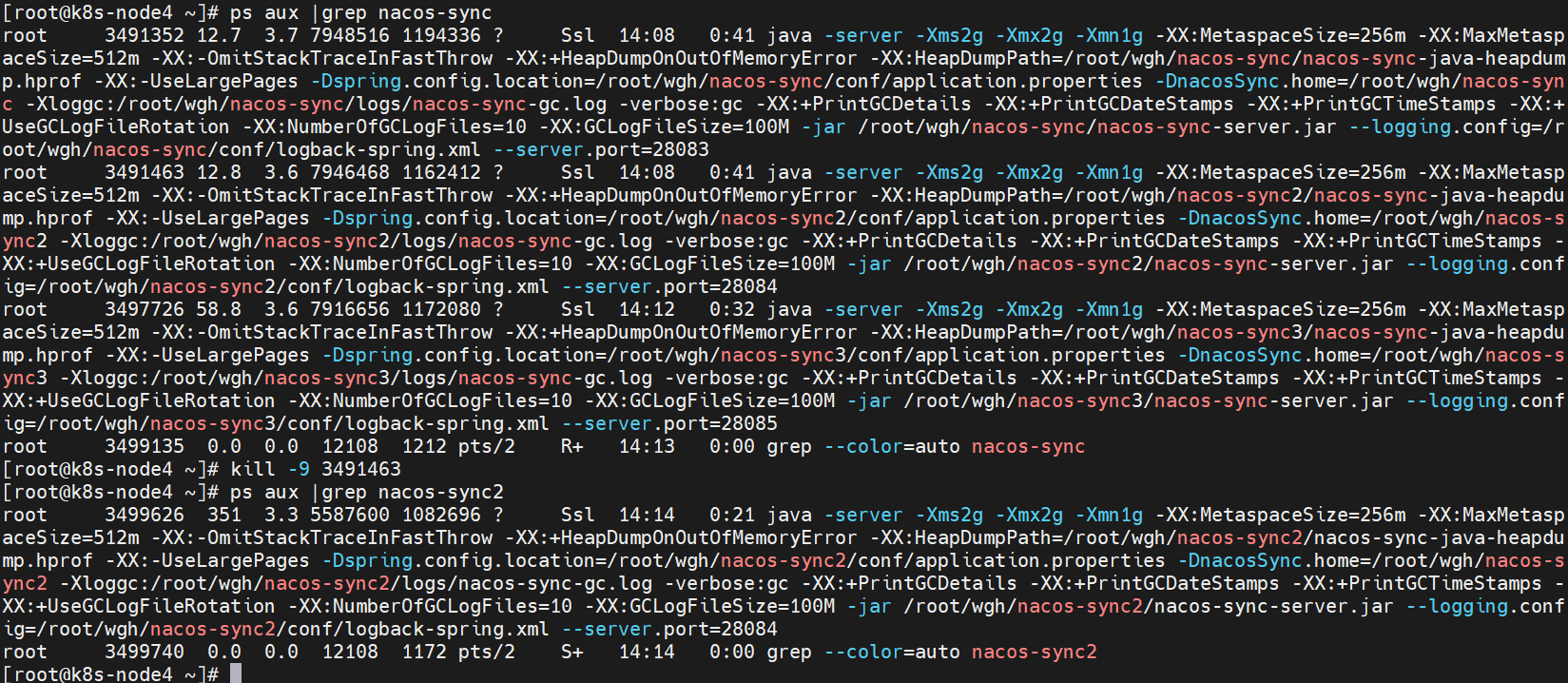
nacos-sync已自动重启。页面正常访问。
查看日志服务正常同步:
